OCR עם AI - זיהוי טקסט ממסמכים סרוקים: מדריך מקיף ומעשי
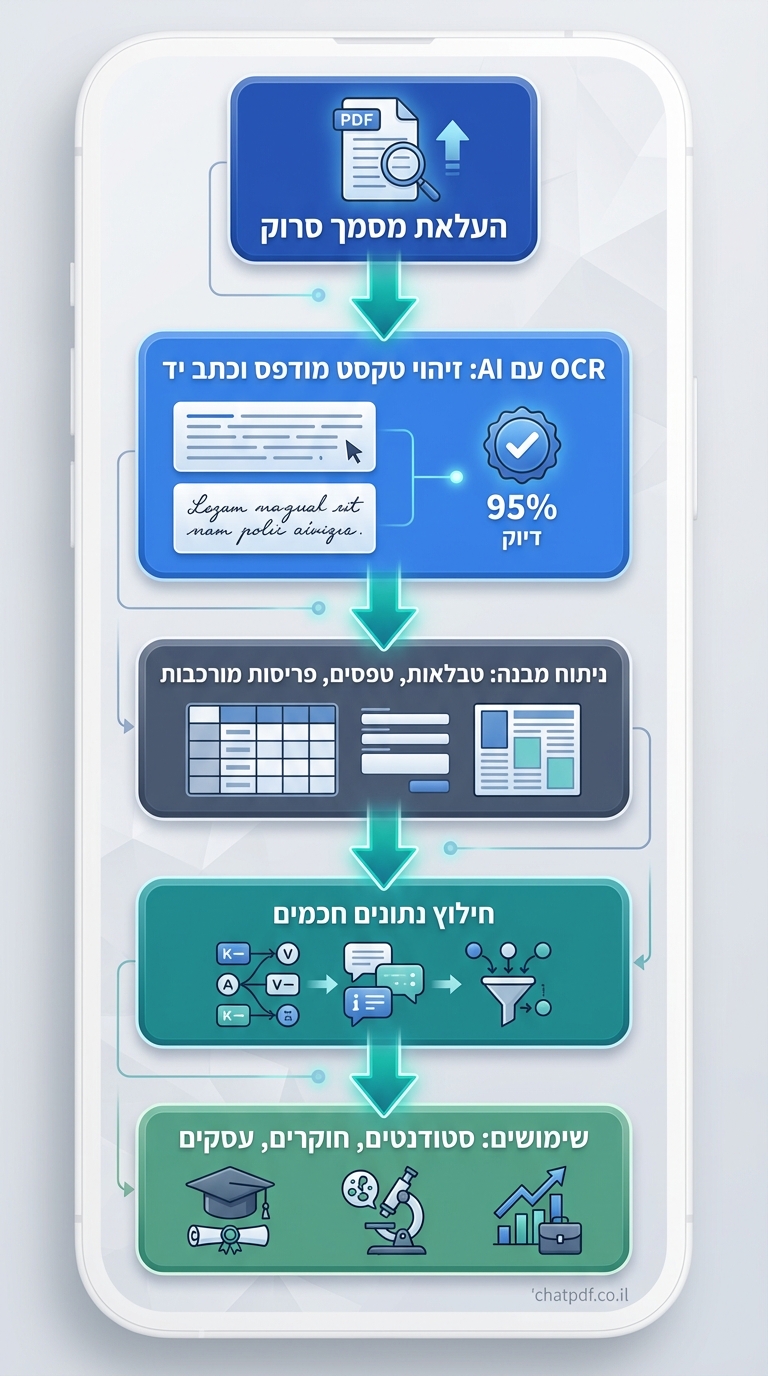
בעידן הדיגיטלי, עובדים עם מסמכים סרוקים מתמודדים עם אתגר מרכזי: חילוץ טקסט ממסמכים לא דיגיטליים כמו חשבוניות, מאמרים אקדמיים, חוזים משפטיים או ידיים בכתב יד. OCR עם AI (זיהוי תווים אופטי מבוסס בינה מלאכותית) פותר זאת על ידי שימוש במודלים מתקדמים כמו Gemini ו-Transformers, שמגיעים לדיוק של עד 98% בטקסט מודפס ו-95% בכתב יד. כלים כמו Google Document AI מפחיתים 80% מעבודת הזנה ידנית, חוסכים זמן לסטודנטים, חוקרים ומנתחים עסקיים. במאמר זה נסקור כלים, מדריכים ושימושים מעשיים.
מה זה OCR עם AI ומה ההבדל מטכנולוגיות מסורתיות?
OCR עם AI משלב למידת מכונה עמוקה, כמו מודלי CRNN ו-Vision Transformers, כדי לזהות טקסט ממסמכים סרוקים באופן חכם יותר. בניגוד ל-OCR קלאסי שמתקשה בסריקות איכות נמוכה או פריסות מורכבות, AI מבין הקשר, מזהה כתב יד בדיוק של 92%-95% ומטפל בשפות רבות. לדוגמה, AI למחקר אקדמי משתמש ב-Donut v2 של Hugging Face שמדלג על שלבי OCR מסורתיים ומגיע ל-91.5% דיוק על נתוני IAM.
יתרונות מרכזיים
- טיפול בסריקות מטושטשות או מעוקמות.
- זיהוי מבנה: טבלאות, חתימות, טפסים.
- תמיכה ב-200+ שפות, כולל עברית.
נניח שיש לכם מאמר של 40 עמודים סרוק – AI יחלץ את הטקסט תוך דקות, מוכן לניתוח.
כלים מובילים לזיהוי טקסט ממסמכים סרוקים עם AI
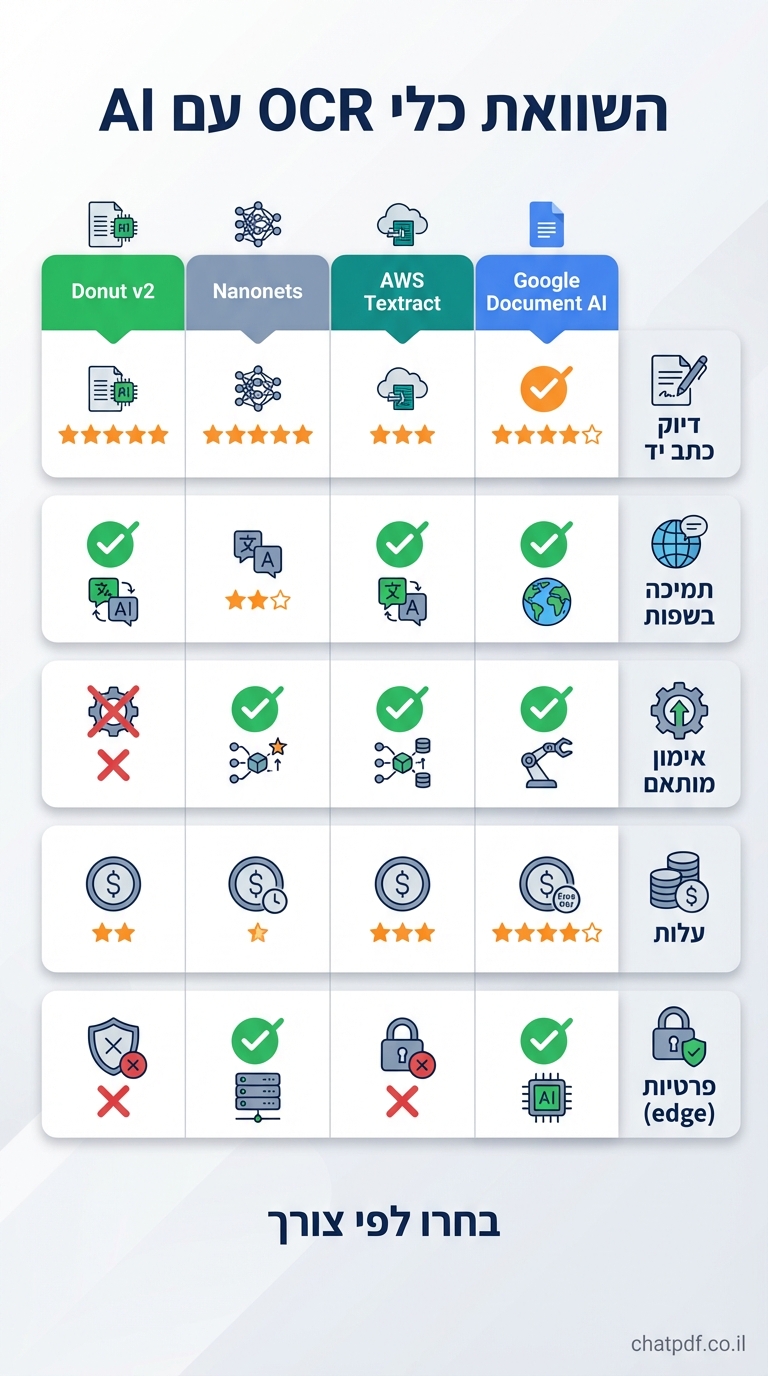
ב-2024, כלים כמו Nanonets, Google Document AI, AWS Textract ו-Azure AI Document Intelligence מובילים. Nanonets מצטיינת באימון מותאם אישית, בעוד Google משלב Gemini לשיפור של 95% בכתב יד. AWS Textract מציע שאילתות בשפה טבעית לחילוץ מידע ללא מודלים מותאמים, חוסך 70% זמן. Hugging Face Donut v2 מציע פתרון קוד פתוח ללא preprocessing.
סקירה קצרה
| כלי | דיוק טקסט מודפס | כתב יד | שפות |
|---|---|---|---|
| Google Document AI | 98% | 95% | רבות |
| AWS Textract | 97% | 92% | רבות |
| Nanonets | 98% | 93% | 200+ |
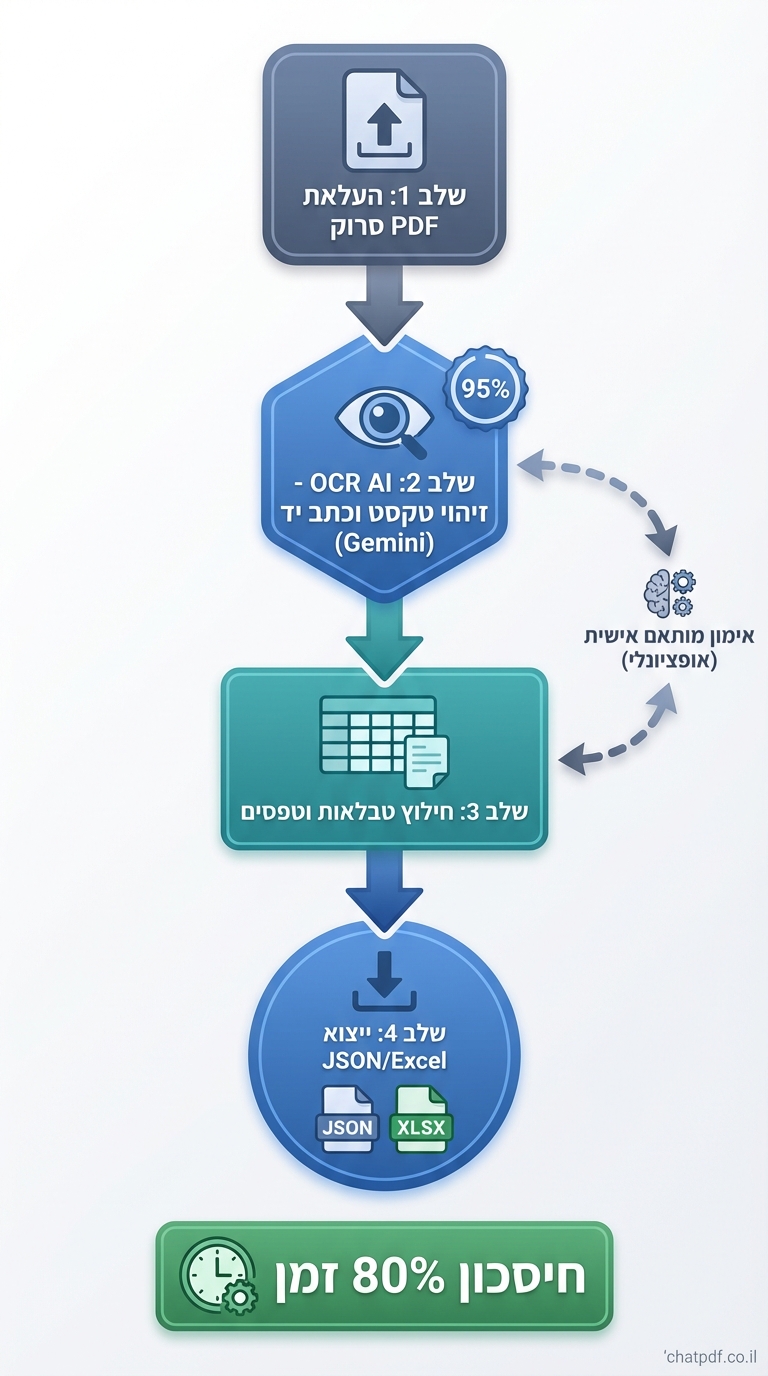
אלה מפחיתים עבודה ידנית ב-80% לעסקים.
מדריך צעד אחר צעד: איך להשתמש ב-Google Document AI ל-OCR
לסטודנטים וחוקרים, התחילו עם Google Cloud. הרשמו ל-OCR עם AI ב-Vertex AI.
- היכנסו ל-Google Cloud Console והפעילו Document AI API.
- העלו מסמך סרוק בפורמט PDF/JPG דרך הקונסולה או API.
- בחרו מודל OCR עם handwriting recognition (preview).
- שלחו בקשה:
processDocumentעם פרמטרים ל-layout analysis. - קבלו JSON עם טקסט מחולץ, entities וטבלאות.
- ייצאו ל-Google Docs או Excel.
דוגמה: עורכי דין מנתחים חוזים סרוקים תוך שניות. שילוב עם ניתוח חוזים עם AI.
שימושים מעשיים של OCR עם AI לסטודנטים, חוקרים ומקצוענים
סטודנטים משתמשים בזה לסיכום מאמרים סרוקים מ-סיכום מאמרים אקדמיים עם AI. חוקרים מחלצים נתונים מדוחות ישנים. עורכי דין בודקים חוזים, אנליסטים עסקיים מנתחים חשבוניות. דוגמה: researcher עם ספר סרוק של 200 עמודים מחלץ ציטוטים בדיוק גבוה.
תרחיש עסקי
ב-Azure AI, batch processing ל-1000 חשבוניות מגביר דיוק טבלאות ב-10%.
יתרונות וחסרונות של OCR עם AI
יתרונות: דיוק גבוה (98% מודפס), טיפול בכתב יד, אימון מותאם, אינטגרציה (Vertex AI, Fabric). חיסכון 70-80% זמן.
למידע נוסף, בקרו ב-כלי AI מומלצים.
למידע נוסף, בקרו ב-הסבר על AI.
חסרונות: עלות API (לפי נפח), תלות באיכות סריקה ראשונית, preview features כמו handwriting. פתרון: no-code כמו Nanonets.
שיקולי אבטחה ופרטיות ב-OCR עם AI
כלים ענן כמו AWS ו-Google מציעים הצפנה end-to-end והגבלת גישה. בחרו edge deployment לפרטיות (Nanonets). בדקו אבטחת מסמכים ב-AI. אל תעלו מסמכים רגישים ללא SOC2 compliance. Hugging Face מאפשר ריצה מקומית.
שאלות נפוצות
האם OCR עם AI מזהה עברית ממסמכים סרוקים?
כן, כלים כמו Azure AI תומכים ב-200+ שפות כולל עברית, עם דיוק גבוה בטקסט מודפס ומשופר בכתב יד. מומלץ לבדוק דוגמאות בסריקות איכותיות; שילוב עם תרגום AI משפר תוצאות.
כמה זמן לוקח לעבד מסמך של 50 עמודים?
ב-Google Document AI או Textract, 1-5 דקות לבאץ', תלוי בגודל. Batch API מאיץ ל-1000 מסמכים/שעה. חיסכון משמעותי לעומת הזנה ידנית של שעות.
האם ניתן לאמן מודל OCR מותאם אישית?
כן, Nanonets ו-Vertex AI מאפשרים אימון על נתונים פרטיים לדיוק 99%. מתאים לחוקרים עם מסמכים ייחודיים כמו כתבי יד עתיקים.
מה העלות של כלים אלה?
Google: $1.50/1000 עמודים; AWS: $0.0015/עמוד. גרסאות חינם מוגבלות. ROI גבוה בגלל חיסכון זמן.
האם זה עובד על סריקות איכות נמוכה?
כן, AI כמו Donut v2 מצטיין בסריקות מטושטשות, עם 91.5% דיוק. שפרו באפליקציות סריקה איכותיות.
סיכום וממלצות: התחילו עם OCR עם AI היום
OCR עם AI משנה את ניהול מסמכים סרוקים. התחילו עם Google Document AI לסטודנטים, Textract לעסקים. צעדים הבאים: נסו דמו חינמי, אמנו מודל, שלבו עם מדריך ChatPDF מלא. עתיד: אפס preprocessing ודיוק מושלם.